
Rooms
AI Bedroom Design: How to Restyle Your Bedroom from One Photo
September 7, 2026 · 8 min read
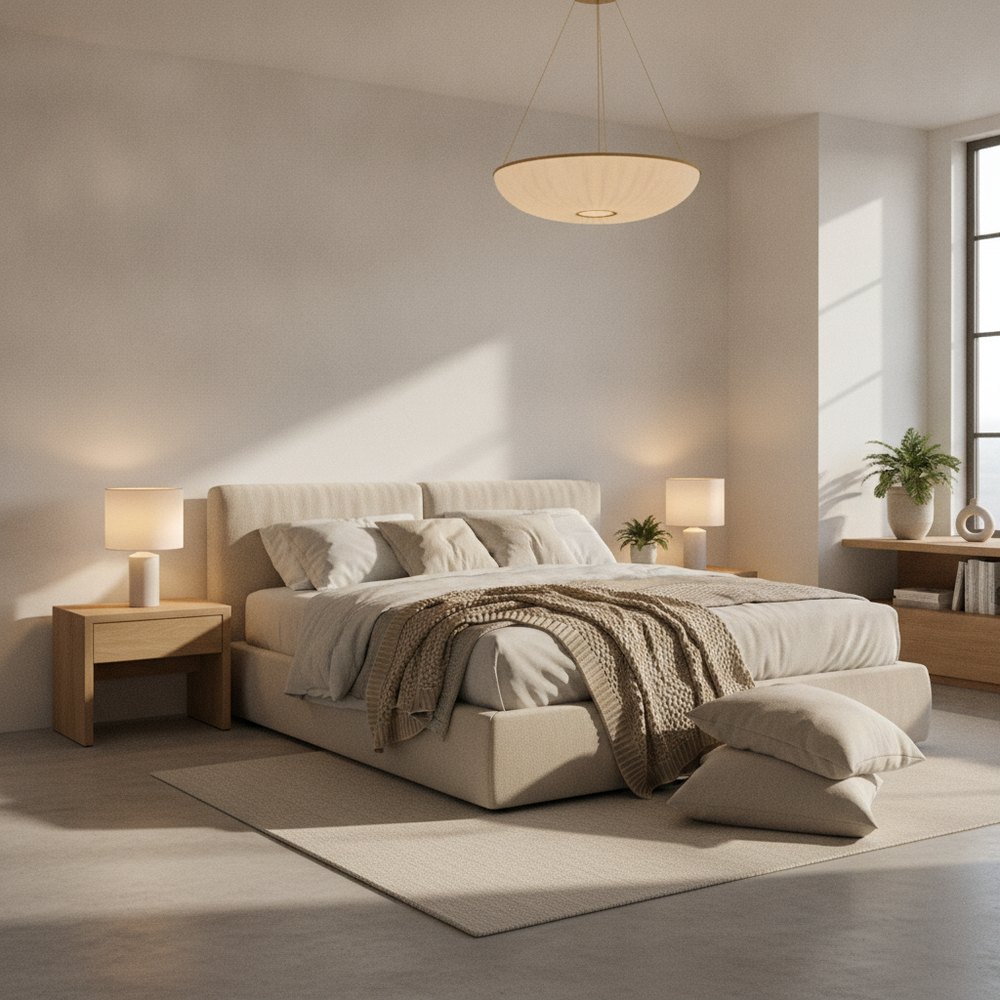
AI bedroom design lets you photograph your bedroom and see it restyled in seconds, with the same walls, window and bed position but a new palette, new bedding, new lighting and new furniture. It is the fastest way to test a mood, warm and cocooning or pale and airy, before you spend anything.
Why the bedroom is the best room to start with
If you are trying an AI design tool for the first time, the bedroom is the room we would point you at, and not because it is easy.
It is because the bedroom is where the gap between how a room looks and how it feels is widest. A bedroom can be perfectly tidy and photograph well and still be a room you do not want to be in, usually because the light is wrong, the palette is cold, or there is nothing soft anywhere. Those are exactly the qualities that are almost impossible to judge from a paint chip and very easy to judge from a photoreal render of your own room.
It is also the room with the fewest constraints. There is no plumbing to work around and rarely a traffic route through it, so the variables really are paint, textiles, lighting and furniture, which is precisely the set an AI tool can change.
What should you ask for, specifically?
The single biggest quality jump comes from describing a mood rather than naming a style. Styles are broad; moods are actionable.
- "Warm and cocooning" gets you deeper wall colours, heavier textiles and low pooled lighting rather than one bright ceiling light.
- "Calm and airy" pushes towards pale walls, light timber, sheer curtains and a lot of negative space.
- "Hotel-like" brings symmetry, matching bedsides, a substantial headboard and restrained styling.
- "Soft and layered" is the phrase to use if your room feels flat: it triggers more textiles, a rug, and mixed materials.
- Name one anchor as well, an oak floor, a green headboard, black metal lighting, so the result has something specific to build around.
How do you make a small bedroom look bigger with AI?
This is the most common request we see, and the useful thing about testing it in AI is that it separates the tricks that genuinely work from the ones people repeat.
Run three versions of your own small bedroom: one with pale walls and a low bed, one with a deep saturated colour on every wall including the ceiling, and one with the wall behind the bed painted darker than the rest. Most people expect the first to win. In practice, the fully saturated version often reads as larger because the corners disappear and the eye stops measuring the boundaries. Seeing that in your own room, rather than in someone else's, is what makes it believable.
For the layout side of the same problem, our guide to making a room look bigger covers the furniture rules that AI cannot decide for you.
Testing bedding and headboards before you buy
Bedding and headboards are the two most expensive things to get wrong in a bedroom, because both are large, both are hard to return, and both change the entire read of the room.
The approach that works is to hold everything else steady and change one variable. Same room, same paint, same lighting: now show me an oatmeal linen headboard, then a deep green velvet one, then a rattan one, then no headboard at all with a panelled wall instead. Because your actual wall colour and window light are in every frame, you are comparing real options rather than four different photographs.
The same trick applies to bedding weight. A crisp white cotton set and a layered, rumpled linen set in the same room produce dramatically different levels of warmth, and it is much easier to see that side by side than to imagine it.
What about lighting?
Bedroom lighting is where most rooms fail and where AI is unusually helpful, because it renders light rather than describing it.
The rule worth testing is simple: no bedroom should rely on a single ceiling light. Ask for the same room with a central pendant only, then with two bedside lamps and a floor lamp and no ceiling light at all. The second will look like somewhere you would want to fall asleep. Seeing the difference rendered is far more persuasive than reading it, which is why it is worth spending a couple of generations on lighting alone before you think about furniture.
Common mistakes when using AI on a bedroom
A few habits that waste generations and produce results you cannot use.
- Photographing the bed head-on. Shoot from a corner so the model can read depth. A flat wall-on shot gives it very little to work with.
- Leaving the ceiling light on in daylight. Mixed light sources make the colour reading unreliable.
- Changing five things at once. If you swap palette, flooring, bed and lighting simultaneously you learn nothing about which change did the work.
- Asking for a style you cannot afford to execute. If the budget is a tin of paint and new bedding, ask for schemes that only change paint and bedding.
- Stopping at the first good result. The second and third generations are usually better, because by then you know what to ask for.
Turning the render into a shopping list
A render is only worth something if it survives contact with a shop, so the last step is translation.
Look at your favourite output and name the five things doing the work. It is usually: wall colour, floor or rug, headboard, bedside lighting, and one textile layer. Write those five down with a rough budget beside each, then shop to that list rather than browsing. Almost everything else in the image is styling you already own or can live without.
If the wall colour is the big move, cross-check it against our guide to paint colours for 2026 and wall colour psychology before you commit to five litres.
See your bedroom restyled
Take one photo from the corner opposite your bed, in daylight, with the lights off. That is genuinely all the setup required.
With Decorly you upload it, choose a mood or describe the bedroom you want, and get a photoreal version of your own room back in seconds, with your window, ceiling and layout intact. Try the cocooning version and the airy version side by side. For more ideas to feed it, see cosy bedroom ideas and small bedroom makeover.
Frequently asked questions
Can AI redesign my bedroom from a photo?
Yes. You upload one clear photo, ideally taken from a corner in daylight, and the tool regenerates the paint, bedding, furniture and lighting while keeping your walls, window and layout exactly where they are. The result is your bedroom restyled, not a stock bedroom.
What is the best way to photograph a bedroom for AI design?
Stand in the corner diagonally opposite the bed, hold the phone level at chest height, shoot in daylight with the artificial lights off, and make sure a full wall and some floor are in frame. That gives the model the depth and light information it needs.
Can AI help make a small bedroom look bigger?
It is one of the most useful things to test with it. Generate the same room in pale tones, in a deep saturated colour, and with a single darker feature wall. Small rooms often read larger in the saturated version because the corners recede, which is much easier to believe when you see it in your own room.
Will AI bedroom design tell me what furniture to buy?
It shows you the style, scale and finish that work in your space, which is most of the battle. It will not give you product links or exact measurements, so treat the render as a brief: note the five elements doing the work and shop against those.